At the start of every race, every car looks roughly the same from the outside. Same tyres on the ground, same driver behind the wheel, same chequered flag waiting at the end. But open the garage doors before the lights go out, and you’ll find something different in every team: decisions made weeks earlier about how the car is organised, what’s accessible, what’s isolated, and what happens when something needs to change at 300 km/h.
A poorly organised car doesn’t fail on the drawing board. It fails in the pit lane, under pressure, when the engineer needs to make a change in three seconds and can’t find what he’s looking for.
Your Kotlin Multiplatform project is no different.
When you start, one module feels like enough. Everything fits, everything is visible, and the build is fast. But as the project grows, more features, more shared logic, more platforms, that single module starts to feel less like a clean garage and more like a storage room where everything ended up because there was nowhere else to put it.
Modularization is how you organise the garage before the race starts. And how you organise it determines everything that happens after.
There are two ways to think about this. You can group things by what they are: all the suspension components together, all the engine parts together, all the electronics in one place. Or you can group things by what they do: everything the car needs to brake, together; everything it needs to accelerate, together.
That distinction sounds small. In a real project, it changes everything.
This is the story of how BitsReader started with the first approach, and why it’s moving to the second.
Why modularize at all?
Before getting into which approach, it’s worth being honest about why modularization exists in the first place, because “it’s a best practice” isn’t a reason, it’s a shortcut.
A single-module project is fast to set up and easy to navigate when the codebase is small. Everything is in one place. You don’t have to think about boundaries. It just works.
The problems arrive quietly. The build starts taking longer. You add a screen and accidentally touch something that has nothing to do with it. A dependency creeps from one layer into another because it was easier. You go to fix a bug in the article reader and find yourself untangling three things that were never meant to be connected.
By the time you feel these problems clearly, the codebase has already grown around them. Modularization is much easier to introduce early than later, which is also why the first version of BitsReader’s module structure was “good enough at the time” and later became the thing I needed to fix.
Layer modularization: organising by what code is
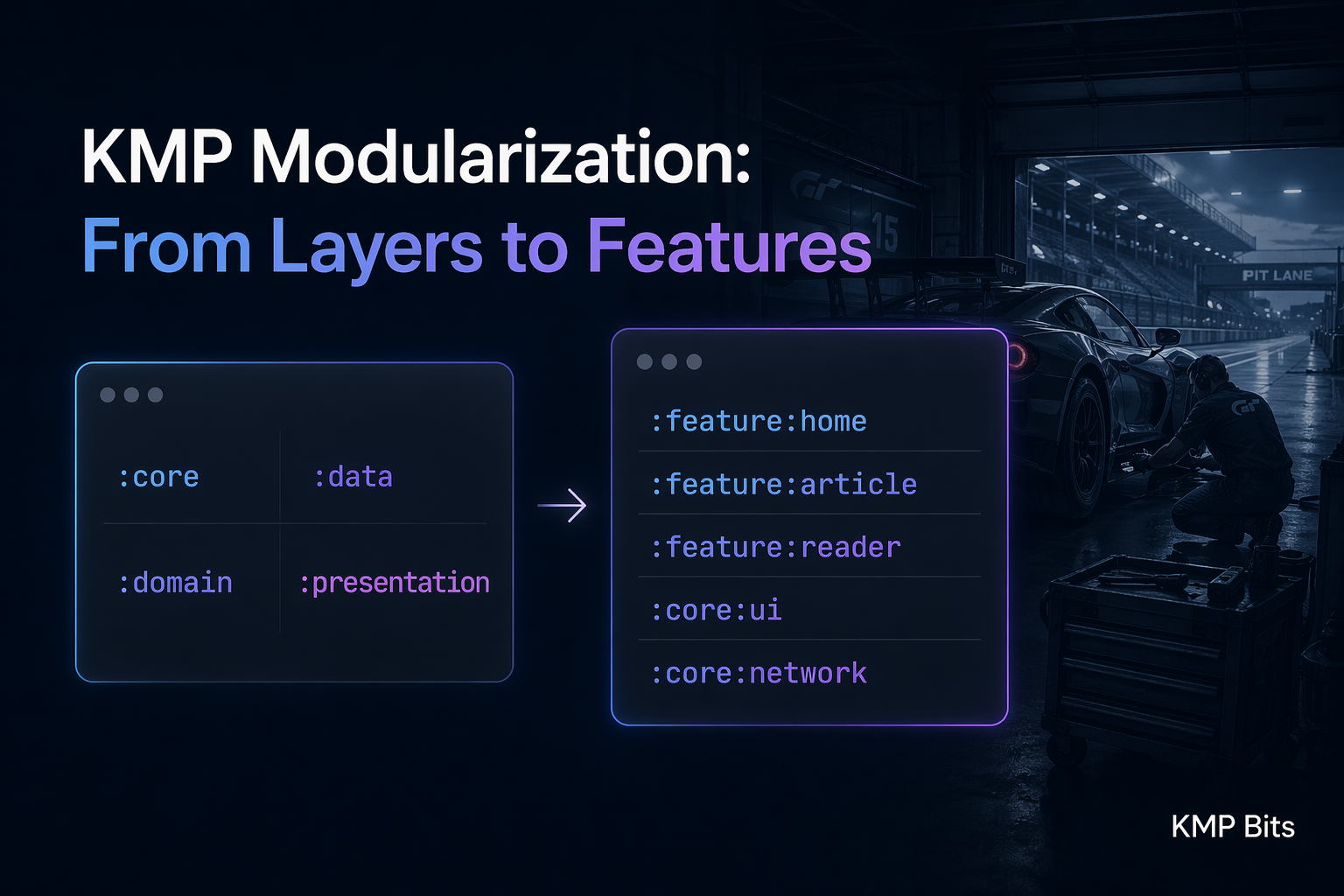
The first approach to modularization, and the one most tutorials reach for, is layer modularization. You split the codebase by architectural layer:
:core
:data
:domain
:presentation
This maps directly onto clean architecture. :data handles repositories and data sources. :domain has use cases and models. :presentation has ViewModels and UI. :core holds shared utilities.
This was BitsReader’s first structure. And it solved the original problem it was designed to solve: it stopped the :presentation layer from reaching directly into :data, which was happening in the single-module version. The boundaries were enforced by the module graph. If :presentation tried to depend on something in :data directly, the build would fail.
That’s real value. For a while, it was enough.
The issue isn’t that layer modularization is wrong. It’s that it optimises for architectural purity more than it optimises for working on the project day to day.
Think back to the garage analogy. Organising by layer is like sorting all the components by type: suspension in one corner, electronics in another, bodywork along the back wall. The organisation is logical. But when you need to work on the braking system, you’re walking between three different corners of the garage.
In practice, this means that every time you work on an app feature, you’re touching :presentation for the UI, :domain for the use case, and :data for the repository. Three modules, one feature. The feature itself has no boundary.
For a small project with one developer, this is manageable. It starts to hurt when the project grows, or when you want the module graph to reflect how the app actually works — not just how the code is classified.
Feature modularization: organising by what code does
Feature modularization reorganises the codebase around user-facing capabilities instead of architectural layers:
:feature:home
:feature:article
:feature:reader
:feature:settings
:ComposeApp
:core:ui
:core:network
:core:data
Everything that belongs to the article list, its ViewModel, its use cases, its repository, its UI, lives in :feature:article. The article reader has its own module. Settings has its own module. They don’t know about each other.
:core modules still exist, but they serve a different purpose: they hold genuinely shared infrastructure: design system components, networking, database access. That multiple features need. The difference is that :core is a toolbox, not a destination for feature code.
This is the “organise by what it does” approach. When you need to work on the article reader, everything you need is in one place. When you need to change the home screen, you’re not touching anything the reader cares about.
Feature modularization forces something into the open: features shouldn’t know about each other. :feature:article doesn’t import :feature:reader. If the reader needs to open from the article list, that navigation goes through a contract in :core - a Navigator or a set of DeepLinkRoutes - not a direct dependency. The app module wires everything at startup. Features never see each other. Swap one out later and nothing else breaks. That’s the seam, not the coupling.
Why BitsReader is making the switch
BitsReader started with layer modularization for a straightforward reason: it was the pattern I knew, it solved the problem I had at the time (uncontrolled layer access), and it was quick to set up.
Two things changed.
First, build times. As the shared KMP module grew: more features, more screens, more logic, incremental builds started taking longer than they should. In a well-modularised project, changing the article reader shouldn’t require recompiling the home screen. With layer modularization, a change in :presentation touches everything that depends on :presentation. With feature modules, a change in :feature:reader touches only what depends on :feature:reader.
Second, isolation. The layer structure enforced vertical boundaries (no :presentation → :data), but it didn’t enforce horizontal ones. There was nothing stopping the article reader’s logic from drifting into the same place as the home screen’s logic. Feature modules make that impossible, not by convention, but by structure.
The migration is still in progress. Moving from layers to features in a live project is not a quick refactor. But the direction is clear, and the reasons are concrete.
If you’re on your own project, the warning signs tend to show up after the fact: you touch three modules every time you add a screen, the build recompiles half the world for a one-line change, or you go to fix something small and end up touching logic that had no business being there. Any of those means the structure is fighting you.
The part that comes next
There’s a third piece to this that I haven’t mentioned yet: build-logic.
Convention plugins, shared Gradle configuration, and the build-logic module are what make feature modularization actually maintainable. Without them, you end up duplicating build configuration across every feature module, which defeats part of the point.
That, along with the actual migration of BitsReader, the problems I hit along the way, and the module structure that came out the other side, is what the next article covers.
BitsReader is available on the App Store and Google Play — built entirely with KMP.
Comments
Loading comments...