In a GT3 car, you have a choice. You can drive with a traditional manual gearbox: clutch pedal, H-pattern shifter, full control over every gear change. Or you can switch to the sequential paddle shifters that most modern GT3 cars run. The car is still yours to drive. The racing line, the braking points, the tyre management. All of that stays with you. The only thing that changes is that you stop managing something that was never really the point.
I’ve been running Koin in a multi-module Compose Multiplatform project for a while, and for a long time it felt like the manual gearbox. Not painful exactly, just present. Every new dependency meant another module { } block somewhere, another get() in the factory lambda, another place where the compiler had nothing to say if I forgot to wire something. The error came at runtime, and usually in a context that made it harder to trace than it should have been.
Metro is the paddle shifters. You annotate your classes, define a graph interface, and the Kotlin compiler plugin generates the wiring at build time. If something is missing from the graph, the build fails. Not the app launch. The build.
I already covered Koin Annotations in a previous article. What follows isn’t a migration guide. It’s a look at three specific patterns that come up in every real KMP project and where Metro’s behaviour changed how I think about dependency injection.
What Metro is
Metro is a compile-time dependency injection framework for Kotlin Multiplatform. It ships as a Kotlin compiler plugin, not an annotation processor or a KSP plugin. Code generation happens in the compiler’s FIR/IR pipeline directly.
The mental model draws from three places: @Inject, @Provides, and the scope system come from Dagger; the interface-based graph definition comes from kotlin-inject; and the contribution aggregation system comes from Anvil. If you’ve worked with any of those three, the ideas transfer quickly.
Metro, Koin Annotations, and Dagger
Before getting into the patterns, it’s worth placing Metro relative to the tools you’ve probably already used.
Koin Annotations
The comparison people reach for first is Koin Annotations, because both claim compile-time safety. I want to be clear about something: these are not competing answers to the same question. They solve the same problem, both do it well, and the choice comes down to what your project actually needs.
Koin Annotations uses KSP to generate source files during the build. It catches graph errors in the KSP phase, which is earlier than runtime, but the Koin service locator container still exists underneath. If something slips through, the app can still throw on startup. The generated .kt files land in build/generated/ksp/, and you need KSP configured and on the right classpath. For most projects, that’s no trouble at all. Koin is mature, widely used, and well documented.
Metro works at a different level. It’s a compiler plugin operating on the IR representation of your code, the same layer where kotlinx.serialization and the Compose compiler plugin live. There are no generated source files, no build/generated/ directory, no KSP classpath to manage. The output is direct constructor calls baked into bytecode. Metro has no runtime container. If the graph is invalid, the build doesn’t produce a binary.
The trade-offs are real on both sides. Metro is strictly static, so dynamic or conditional bindings that Koin handles without friction are outside Metro’s scope. And Metro is a newer library, primarily maintained by one person. Koin has years of production use behind it.
My take: if your team already knows Koin, or you need dynamic binding flexibility, stick with Koin Annotations. If you want the strictest compile-time guarantee with no runtime container underneath, Metro is the right call.
If you know Dagger
If you’ve used Dagger before, Metro will feel familiar in the right places. @Inject, @Provides, scope annotations, and compile-time graph validation are all there. The graph interface replaces Dagger’s @Component, @DependencyGraph.Factory replaces @Component.Builder, and @ContributesBinding replaces the manual @Binds plus module wiring you’d write by hand in Dagger.
Metro is a compiler plugin rather than an annotation processor, so no KAPT, no KSP, no generated source files to track. The interface-based graph definition is cleaner than Dagger’s abstract class components. And Metro supports Kotlin Multiplatform natively. Dagger never did. If you’ve used Hilt, the @ContributesBinding aggregation pattern will look familiar: Metro borrows it from Anvil, which is what Hilt builds on.
Where Dagger still has an edge: it’s been used in large Android codebases for over a decade, the tooling is more mature, and the error messages are better when something goes wrong. If you’re on a large Android-only project with an existing Dagger graph, there’s rarely a reason to migrate.
The demo
The three patterns I want to show are easier to understand in context than in isolation. To make them concrete, I built a fake real-time chat app: a conversations list, a notification permission screen, and a chat room with a scoped WebSocket. No server, no real backend. Just hardcoded data and coroutine timers. Each screen demonstrates one Metro concept, and together they cover the situations you’ll hit in almost any real KMP project.
The article focuses entirely on the DI wiring. The UI is minimal by design.
Setup
# gradle/libs.versions.toml
[versions]
metro = "1.0.0"

[plugins]
metro = { id = "dev.zacsweers.metro", version.ref = "metro" }

[libraries]
metro-viewmodel = { module = "dev.zacsweers.metro:metrox-viewmodel", version.ref = "metro" }
metro-viewmodel-compose = { module = "dev.zacsweers.metro:metrox-viewmodel-compose", version.ref = "metro" }
// build.gradle.kts (root)
plugins {
alias(libs.plugins.metro) apply false
}Apply the plugin to every module that contains Metro annotations and add the ViewModel extensions to the modules that need them:
// composeApp/build.gradle.kts
plugins {
    alias(libs.plugins.metro)
}

kotlin {
    sourceSets {
        commonMain.dependencies {
            implementation(libs.metro.viewmodel)
            implementation(libs.metro.viewmodel.compose)
        }
    }
}
metrox-viewmodel and metrox-viewmodel-compose are what give you ViewModelGraph, LocalMetroViewModelFactory, and @ContributesIntoMap for lifecycle-aware ViewModel injection. The demo uses all three.
One Gradle plugin, two extra libraries. No annotation processor configuration, no generated source directories to wire into your source sets.
The project organises code by package rather than separate Gradle modules. Metro’s contribution system works at the annotation level, not the module boundary, so packages are enough. A scope marker is all you need to get started:
// commonMain/di/AppScope.kt
import dev.zacsweers.metro.Scope

@Scope
annotation class AppScope
Feature 1: Conversations list
This is the baseline. The pattern you’ll use for most features in any KMP project.
The interface lives in the domain layer:
// commonMain/feature/conversations/domain/ConversationRepository.kt
interface ConversationRepository {
    suspend fun getConversations(): List<Conversation>
}
The implementation attaches itself to the graph:
// commonMain/feature/conversations/data/FakeConversationRepository.kt
import dev.zacsweers.metro.ContributesBinding
import dev.zacsweers.metro.Inject
import dev.zacsweers.metro.SingleIn
import kotlinx.coroutines.delay

@Inject
@ContributesBinding(AppScope::class)
@SingleIn(AppScope::class)
class FakeConversationRepository : ConversationRepository {

    override suspend fun getConversations(): List<Conversation> {
        delay(300) // fake network latency
        return listOf(
            Conversation(id = "1", name = "Garage channel", lastMessage = "Tyres are warm."),
            Conversation(id = "2", name = "Pit wall", lastMessage = "Box this lap.")
        )
    }
}
@ContributesBinding(AppScope::class) tells Metro: this class implements ConversationRepository and belongs to AppScope. The root graph never needs to declare it. Metro aggregates everything contributed to a scope automatically at compile time. @SingleIn(AppScope::class) keeps one instance alive for the app’s lifetime. Remove it and Metro creates a new repository on every injection, which is almost never what you want for a repository.
This is the pattern that makes multi-feature wiring low-ceremony. Each feature declares its own contributions and the root graph stays small.
Lifecycle-aware ViewModel injection
The ViewModel follows the same constructor injection pattern, but contributing it uses a map:
// commonMain/feature/conversations/presentation/ConversationsViewModel.kt
import androidx.lifecycle.ViewModel
import androidx.lifecycle.viewModelScope
import dev.zacsweers.metro.ContributesIntoMap
import dev.zacsweers.metro.Inject
import dev.zacsweers.metro.ViewModelKey
import dev.zacsweers.metro.binding
import kotlinx.coroutines.flow.MutableStateFlow
import kotlinx.coroutines.flow.StateFlow
import kotlinx.coroutines.launch

@Inject
@ContributesIntoMap(AppScope::class, binding = binding<ViewModel>())
@ViewModelKey(ConversationsViewModel::class)
class ConversationsViewModel(
    private val repository: ConversationRepository
) : ViewModel() {

    private val _conversations = MutableStateFlow<List<Conversation>>(emptyList())
    val conversations: StateFlow<List<Conversation>> = _conversations

    init {
        viewModelScope.launch {
            _conversations.value = repository.getConversations()
        }
    }
}
@ContributesIntoMap puts this ViewModel into a map that Metro generates for the scope. The @ViewModelKey annotation sets the key. That map feeds into MetroViewModelFactory, an abstract class from Metro’s ViewModel extensions that you subclass once per scope.
Metro won’t provide MetroViewModelFactory automatically. It’s abstract and has no @Inject constructor. You bridge the gap with a small file that subclasses it for each scope:
// commonMain/di/ViewModelFactory.kt
@Inject
@ContributesBinding(AppScope::class)
@SingleIn(AppScope::class)
class AppViewModelFactory(
    override val viewModelProviders: Map<KClass<out ViewModel>, () -> ViewModel>,
    override val assistedFactoryProviders: Map<KClass<out ViewModel>, () -> ViewModelAssistedFactory>,
    override val manualAssistedFactoryProviders: Map<KClass<out ManualViewModelAssistedFactory>, () -> ManualViewModelAssistedFactory>,
) : MetroViewModelFactory()

@Inject
@ContributesBinding(ChatScope::class)
@SingleIn(ChatScope::class)
class ChatViewModelFactory(
    override val viewModelProviders: Map<KClass<out ViewModel>, () -> ViewModel>,
    override val assistedFactoryProviders: Map<KClass<out ViewModel>, () -> ViewModelAssistedFactory>,
    override val manualAssistedFactoryProviders: Map<KClass<out ManualViewModelAssistedFactory>, () -> ManualViewModelAssistedFactory>,
) : MetroViewModelFactory()
Both classes are @Inject, so Metro can construct them. The three maps are populated from @ContributesIntoMap contributions in the matching scope. @ContributesBinding wires AppViewModelFactory to the MetroViewModelFactory binding in AppScope, and the same pattern applies for ChatViewModelFactory in ChatScope.
ViewModelGraph then exposes metroViewModelFactory, which you provide through a CompositionLocal:
// commonMain/App.kt
@Composable
fun App(graph: RootGraph) {
    CompositionLocalProvider(LocalMetroViewModelFactory provides graph.metroViewModelFactory) {
        AppTheme { AppEntry() }
    }
}
Inside any screen below that provider, metroViewModel<ConversationsViewModel>() resolves from the map, scoped to the back stack entry, cleaned up when the screen pops. The Metro wiring doesn’t touch any of that: it just provides the factory.
A quick note on
metroViewModelFactory: Compose’sviewModel()function uses reflection by default, which doesn’t work with Metro since there’s no runtime container.metroViewModel<T>()frommetrox-viewmodel-composereadsLocalMetroViewModelFactoryand constructs ViewModels from the contributed map instead. TheMetroViewModelFactorysubclass you write inViewModelFactory.ktis the bridge: it takes the generated provider maps as constructor arguments and wires them into the factory. Everything else works exactly as you’d expect from the Jetpack ViewModel API.
The thing that clicked for me: @ContributesBinding contributes a single binding, @ContributesIntoMap contributes an entry to a map. Both are aggregated automatically. Neither requires touching the root graph.
Feature 2: Notification permission
This is where Metro in a multiplatform project gets genuinely tricky, and where the constraint that makes it correct becomes obvious.
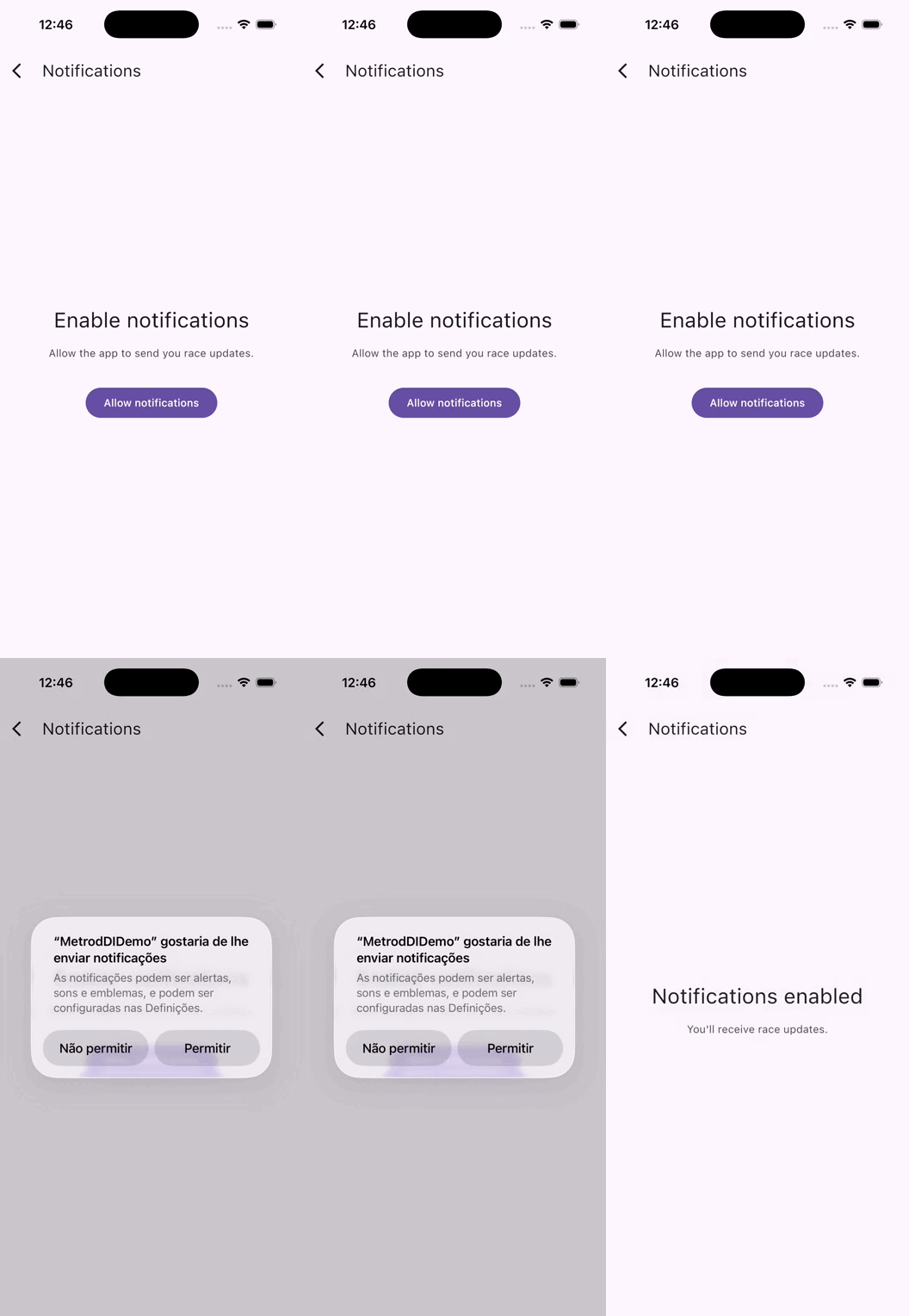
On Android, requesting notification permission requires Context, which goes to ActivityCompat.requestPermissions. On iOS, you use UNUserNotificationCenter. Neither type exists in commonMain. The interface for the provider lives there, but the implementations are entirely platform-specific. If you want a deep dive into cross-platform notifications with KMP, I covered the full setup in a previous article.
The instinct is to put @DependencyGraph on the common interface and let platform graphs extend it:
// WRONG: fails to compile on the iOS target
// commonMain/di/AppGraph.kt
@DependencyGraph(scope = AppScope::class)
interface AppGraph {
    @DependencyGraph.Factory
    fun interface Factory {
        fun create(@Provides context: Context): AppGraph // Context is an Android type
    }
}
The iOS compiler doesn’t know what Context is. The build fails with an unresolved reference. After that error, we can try @GraphExtension. Metro provides it for extending an existing graph, but @GraphExtension.Factory is a different annotation from @DependencyGraph.Factory, and createGraphFactory only accepts the second one. You end up with a graph you can’t instantiate.
I went through both of those dead ends before the correct pattern became clear: the common interface is just a plain Kotlin interface with no Metro annotations. The @DependencyGraph goes only on the platform-specific implementations.
// commonMain/di/RootGraph.kt
import dev.zacsweers.metrox.viewmodel.ViewModelGraph

// Plain Kotlin interface, no @DependencyGraph
interface RootGraph : ViewModelGraph {
    val platformNotificationProvider: PlatformNotificationProvider
}
// androidMain/di/AndroidRootGraph.kt
import dev.zacsweers.metro.DependencyGraph
import dev.zacsweers.metro.Provides
@DependencyGraph(scope = AppScope::class)
interface AndroidRootGraph : RootGraph {
@DependencyGraph.Factory
fun interface Factory {
fun create(@Provides context: Context): AndroidRootGraph
}
}// iosMain/di/IosRootGraph.kt
import dev.zacsweers.metro.DependencyGraph
@DependencyGraph(scope = AppScope::class)
interface IosRootGraph : RootGraphCreating the graph on each platform:
// androidMain/App.kt
class App : Application() {
    val graph: RootGraph by lazy {
        createGraphFactory<AndroidRootGraph.Factory>().create(applicationContext)
    }
}
// iosMain/MainViewController.kt
fun MainViewController() = ComposeUIViewController {
val graph = remember { createGraph<IosRootGraph>() }
App(graph)
}createGraph<T>() expects T to be a @DependencyGraph with no required external parameters. createGraphFactory<F>() expects F to be a @DependencyGraph.Factory inside a graph that needs those parameters. Both return a RootGraph, which is what the shared App() composable receives. The composable never needs to know which platform it’s running on.
Platform implementations
The notification provider expect class lives in common:
// commonMain/core/domain/PlatformNotificationProvider.kt
import kotlinx.coroutines.flow.StateFlow

expect class PlatformNotificationProvider {
    val permissionGranted: StateFlow<Boolean>
    fun requestPermission()
    fun observeNotificationServicePermission()
}
The Android implementation uses Context and an ActivityHolder, a wrapper that MainActivity updates on onCreate/onDestroy so DI-managed classes can reach the current Activity without holding a direct reference to it:
// androidMain/feature/notifications/data/PlatformNotificationProviderImpl.kt
@Inject
@SingleIn(AppScope::class)
actual class PlatformNotificationProvider(
    private val context: Context,
    private val activityHolder: ActivityHolder
) {
    companion object {
        const val REQUEST_CODE_NOTIFICATIONS = 1001
    }

    private val _permissionGranted = MutableStateFlow(false)
    actual val permissionGranted: StateFlow<Boolean> = _permissionGranted

    actual fun requestPermission() {
        val activity = activityHolder.get() ?: return
        ActivityCompat.requestPermissions(
            activity,
            arrayOf(Manifest.permission.POST_NOTIFICATIONS),
            REQUEST_CODE_NOTIFICATIONS
        )
    }

    actual fun observeNotificationServicePermission() {
        _permissionGranted.value = ContextCompat.checkSelfPermission(
            context, Manifest.permission.POST_NOTIFICATIONS
        ) == PackageManager.PERMISSION_GRANTED
    }
}| Android | iOS |
|---|---|
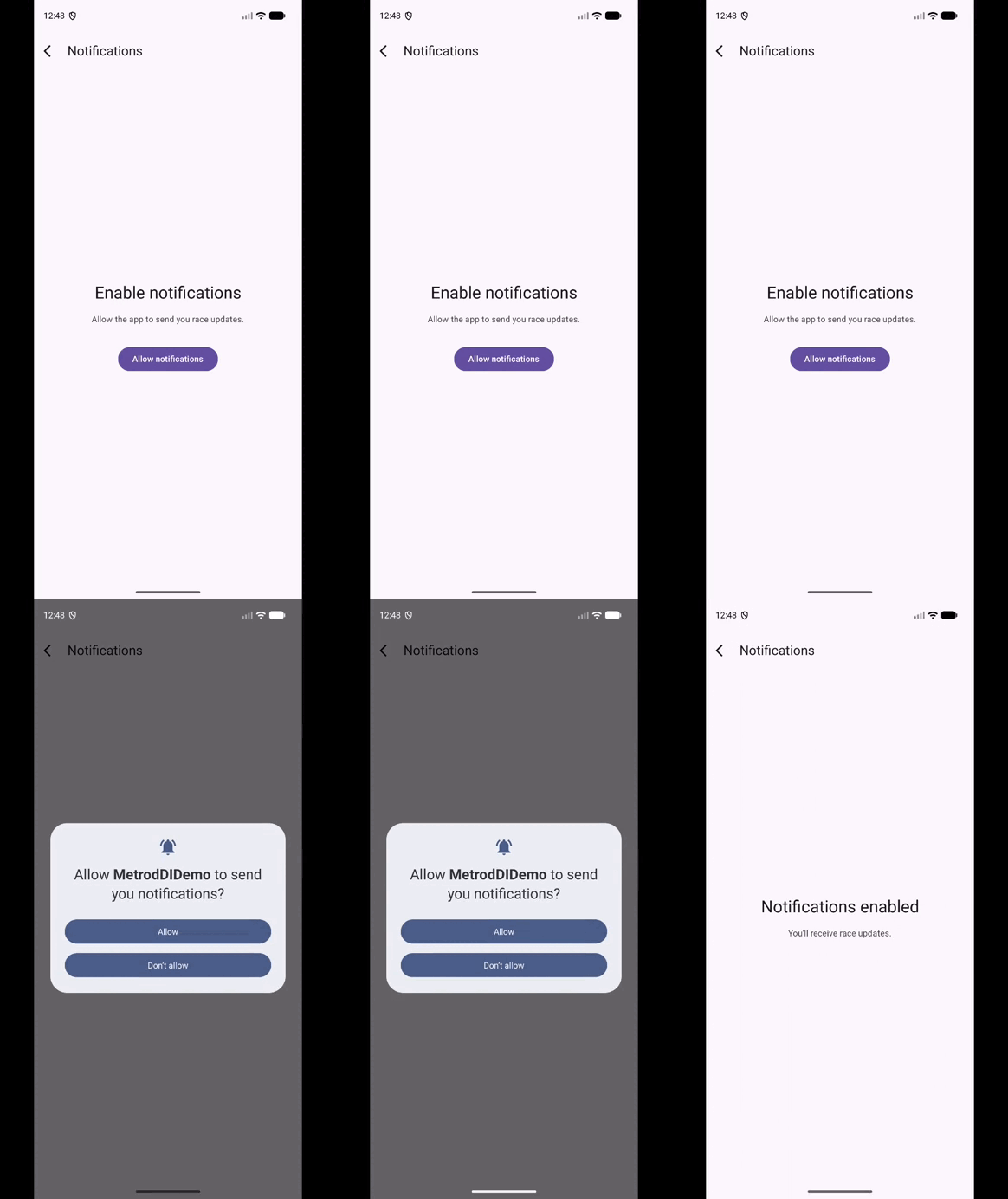 |  |
Android doesn’t deliver permission results to DI-managed classes. They come back to Activity.onRequestPermissionsResult. The pattern that works: MainActivity calls observeNotificationServicePermission() in the callback, the provider re-reads the system state, and the MutableStateFlow updates. Everything else observes the flow.
// androidMain/MainActivity.kt
override fun onRequestPermissionsResult(
    requestCode: Int,
    permissions: Array<out String?>,
    grantResults: IntArray,
    deviceId: Int
) {
    super.onRequestPermissionsResult(requestCode, permissions, grantResults, deviceId)
    if (requestCode == PlatformNotificationProviderImpl.REQUEST_CODE_NOTIFICATIONS) {
        graph.platformNotificationProvider.observeNotificationServicePermission()
    }
}
The iOS implementation uses UNUserNotificationCenter.
The error you get if you annotate the common graph isn’t Metro being fussy. It’s the compiler catching a design that would break the iOS build entirely. The plain interface isn’t a workaround. It’s the correct model.
Feature 3: Chat room
This is the pattern I wanted to understand before committing to Metro seriously. The first two features use AppScope for everything, which makes sense: repositories and providers live for the app’s lifetime. But not everything does.
A WebSocket isn’t a data object. It connects on creation and needs to be explicitly closed. Keeping it in AppScope means the socket stays open for the entire app lifetime, even when the user is on a completely different screen. That’s almost never what you want for a real-time connection.
A scope is a lifetime, not a namespace. The ChatScope exists because the socket needs to opened when the chat screen opens and closed when it leaves. And because every chat room is a different conversation, there’s a second problem to solve: the conversation ID is only known at runtime, when the user taps a row. Metro needs to receive it and make it available to anything in the scope.
Here’s how the two scopes relate in the demo:
AppScope  (AndroidRootGraph / IosRootGraph)
├── ConversationRepository       singleton, lives for the app's lifetime
├── PlatformNotificationProvider singleton, lives for the app's lifetime
├── AppViewModelFactory
│
└── ChatScope  (ChatGraph) ──── created via ChatGraph.Factory at navigation time
    ├── ConversationId           runtime value, injected through the factory parameter
    ├── ChatSocket               singleton within this scope
    └── ChatViewModelFactory
ChatScope is nested inside AppScope and inherits all of its bindings. ChatGraph uses @GraphExtension for exactly that reason. Anything in ChatScope can ask for ConversationRepository or PlatformNotificationProvider and Metro will resolve them from the parent graph. The reverse isn’t true: AppScope knows nothing about ChatSocket or ConversationId.
The scope and the socket
// commonMain/di/ChatScope.kt
import dev.zacsweers.metro.Scope

@Scope
annotation class ChatScope
The conversation ID is a runtime value, so it gets a proper type:
// commonMain/feature/chat/domain/ConversationId.kt
@JvmInline
value class ConversationId(val value: String)
A value class, different from a raw String, keeps the binding unambiguous. Metro identifies bindings by type, so ConversationId and String are different things in the graph.
// commonMain/feature/chat/data/ChatSocket.kt
@Inject
@SingleIn(ChatScope::class)
class ChatSocket(val conversationId: ConversationId) {

    private val _messages = MutableStateFlow<List<ChatMessage>>(emptyList())
    val messages: StateFlow<List<ChatMessage>> = _messages

    private val _isTyping = MutableStateFlow(false)
    val isTyping: StateFlow<Boolean> = _isTyping

    private var job: Job? = null

    init {
        job = CoroutineScope(Dispatchers.Default).launch {
            var lap = 1
            while (true) {
                delay(2_000)
                _isTyping.value = true
                delay(1_000)
                _isTyping.value = false
                _messages.update {
                    it + ChatMessage(sender = "Engineer", text = "Lap $lap: pace looks good.")
                }
                lap++
            }
        }
    }

    fun close() {
        job?.cancel()
        job = null
    }
}
ChatSocket declares ConversationId as a constructor parameter. Metro will inject it, no special annotation needed on the parameter itself. The binding just has to exist somewhere in the scope, and the factory is where it comes from.
@SingleIn(ChatScope::class) means one ChatSocket per ChatGraph. Not one per app, one per chat session. Navigate away and come back, and you get a fresh socket with its own conversation ID.
The graph extension
The chat graph uses @GraphExtension rather than @DependencyGraph. The difference is that @GraphExtension extends an existing parent graph and inherits all of its bindings. @DependencyGraph creates a standalone graph that knows nothing about its caller.
// commonMain/di/ChatGraph.kt
import dev.zacsweers.metro.GraphExtension
import dev.zacsweers.metro.Provides
import dev.zacsweers.metrox.viewmodel.ViewModelGraph

@GraphExtension(scope = ChatScope::class)
interface ChatGraph : ViewModelGraph {
    val chatSocket: ChatSocket

    @ContributesTo(AppScope::class)
    @GraphExtension.Factory
    fun interface Factory {
        fun create(@Provides conversationId: ConversationId): ChatGraph
    }
}
@Provides on the factory parameter is Metro’s answer to runtime injection. When create(conversationId) is called, Metro takes that value and makes it available as a binding for the entire ChatScope. ChatSocket asks for ConversationId in its constructor; Metro delivers the one passed into the factory. No extra wiring, no manual passing.
ConversationId isn’t being threaded through a call chain. It’s a graph-level binding. Any class in ChatScope can list it as a constructor parameter and get the right one automatically. The ChatGraph instance is this specific conversation. Add a read-receipt tracker or a typing service later and they get the ID for free, for as long as the socket is alive.
@ContributesTo(AppScope::class) on the factory tells Metro to aggregate it into the root graph automatically, so the root graph exposes chatGraphFactory without needing to declare it explicitly.
The entry composable
// commonMain/feature/chat/presentation/ChatEntry.kt
@Composable
fun ChatEntry(
    factory: ChatGraph.Factory,
    conversationId: ConversationId,
    onBackClick: () -> Unit
) {
    val graph = remember { factory.create(conversationId) }

    DisposableEffect(Unit) {
        onDispose { graph.chatSocket.close() }
    }

    CompositionLocalProvider(LocalMetroViewModelFactory provides graph.metroViewModelFactory) {
        ChatScreen(onBackClick = onBackClick)
    }
}
remember { factory.create(conversationId) } creates the graph once for the lifetime of this composable. The conversationId comes from the navigation back-stack entry and is fixed for the session, which is why remember with no key is correct here. DisposableEffect with onDispose calls close() when the composable leaves the composition. CompositionLocalProvider swaps the ViewModel factory to the one backed by ChatScope, so metroViewModel() calls inside ChatScreen resolve from ChatGraph, not the root AppScope factory.
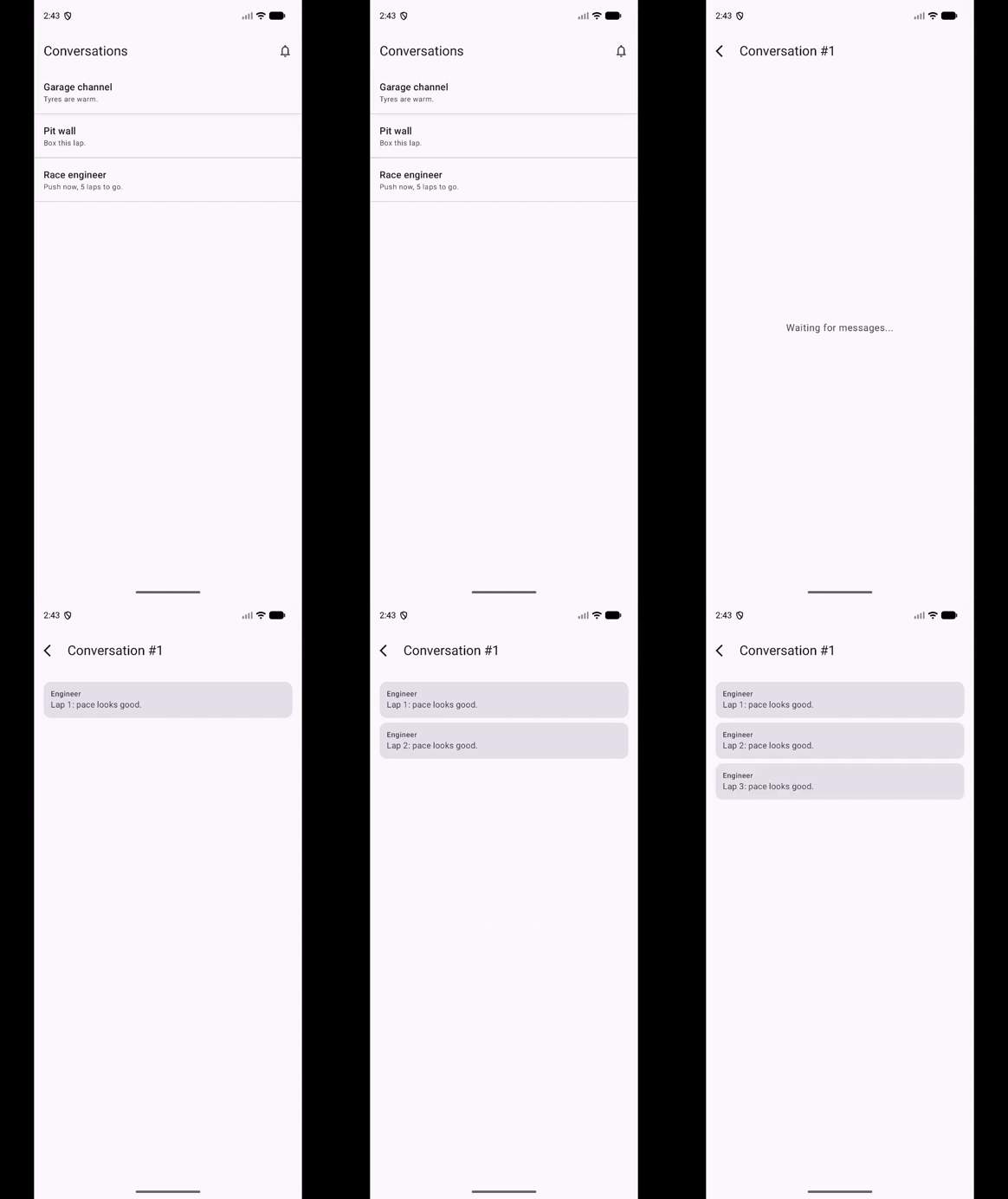
The socket starts emitting as soon as ChatEntry enters the composition. While the screen is open, a new message arrives every three seconds, preceded by a one-second typing indicator. The moment you navigate away, onDispose fires, close() cancels the coroutine, and it stops. Navigate back to a different conversation and you get a fresh ChatGraph, a fresh ChatSocket, and a new ConversationId, all from a single factory.create(newId) call.
AppScope would mean the socket survives every screen transition for the app’s entire lifetime. ChatScope means it lives exactly as long as the chat screen. The @Provides on factory parameter means runtime values flow into the scope cleanly, without leaking Android lifecycle details into the graph definition.
Gotchas
Most of these I hit personally while building the demo. Metro’s error messages are generally good, but a few failure modes produce errors that point at the wrong place. You see the interface in the message, not the implementation that caused the problem. That’s the pattern to watch for.
internal on @ContributesBinding classes.
If a contributed class is internal (Usually on a multi module project), Metro can’t aggregate it across module boundaries. The reason: Metro’s compiler plugin generates glue code that references your class by name. If that class is internal, the generated code sits outside the declaring module’s visibility boundary and can’t see it. The build succeeds, but you’ll get a MissingBinding error naming the interface, not the implementation. This one is hard to trace the first time. Keep contributed classes public (the default) or at least within the same Gradle module as every class that needs them.
@DependencyGraph cannot extend @DependencyGraph.
Metro rejects this at compile time: “Graph class may not directly extend graph class.” The plain-interface pattern from Feature 2 is the correct solution: annotate only the platform-specific leaf implementations.
createGraph vs createGraphFactory.
createGraph<T>() expects T to be a @DependencyGraph with no required external parameters. createGraphFactory<F>() expects F to be a @DependencyGraph.Factory. These are different annotations; mixing them produces a compiler error that points at the right place, but the fix isn’t obvious until you understand the split.
@GraphExtension vs @DependencyGraph for child graphs.
Use @GraphExtension when the child graph should inherit parent bindings, which is the right choice for a scoped feature graph like ChatGraph. Use @DependencyGraph only for the root platform graphs. Mixing them up produces a graph that either can’t see parent bindings or can’t be instantiated correctly.
Scope mismatch.
A class scoped to ChatScope that gets injected into something in AppScope produces a MissingBinding error at compile time. The error names the interface, not the implementation. When you see it, check whether the implementation is scoped to a graph the requester can’t reach.
Manifest permissions are a separate concern.
This is more an Android issue. Metro wires up a class that calls requestPermissions correctly. But if POST_NOTIFICATIONS isn’t declared in AndroidManifest.xml, the dialog won’t appear and there’s no error anywhere. Always check the manifest first if a permission flow does nothing.
Wrapping up
Metro moves dependency graph validation from runtime to compile time, and that shift changes how you think about DI mistakes. The patterns here cover most of the ground: binding contributions for everyday features, the platform graph split for anything that needs Android or iOS types, and child scopes for dependencies with a real lifecycle, including runtime values like a conversation ID flowing in through a factory parameter. Get those three things in place and the rest of the wiring tends to solve itself.
The paddle shifters don’t make you a faster driver. But they do free up your hands for the things that actually determine where you finish.
The full demo for this article is available on GitHub.
The KMP Bits app is available on App Store and Google Play, built entirely with KMP.
Comments
Loading comments...